
Beyond Backups: Building Reliable Data Recovery Systems
How database backups, point-in-time recovery, replication, and disaster recovery strategies protect business data and application continuity.

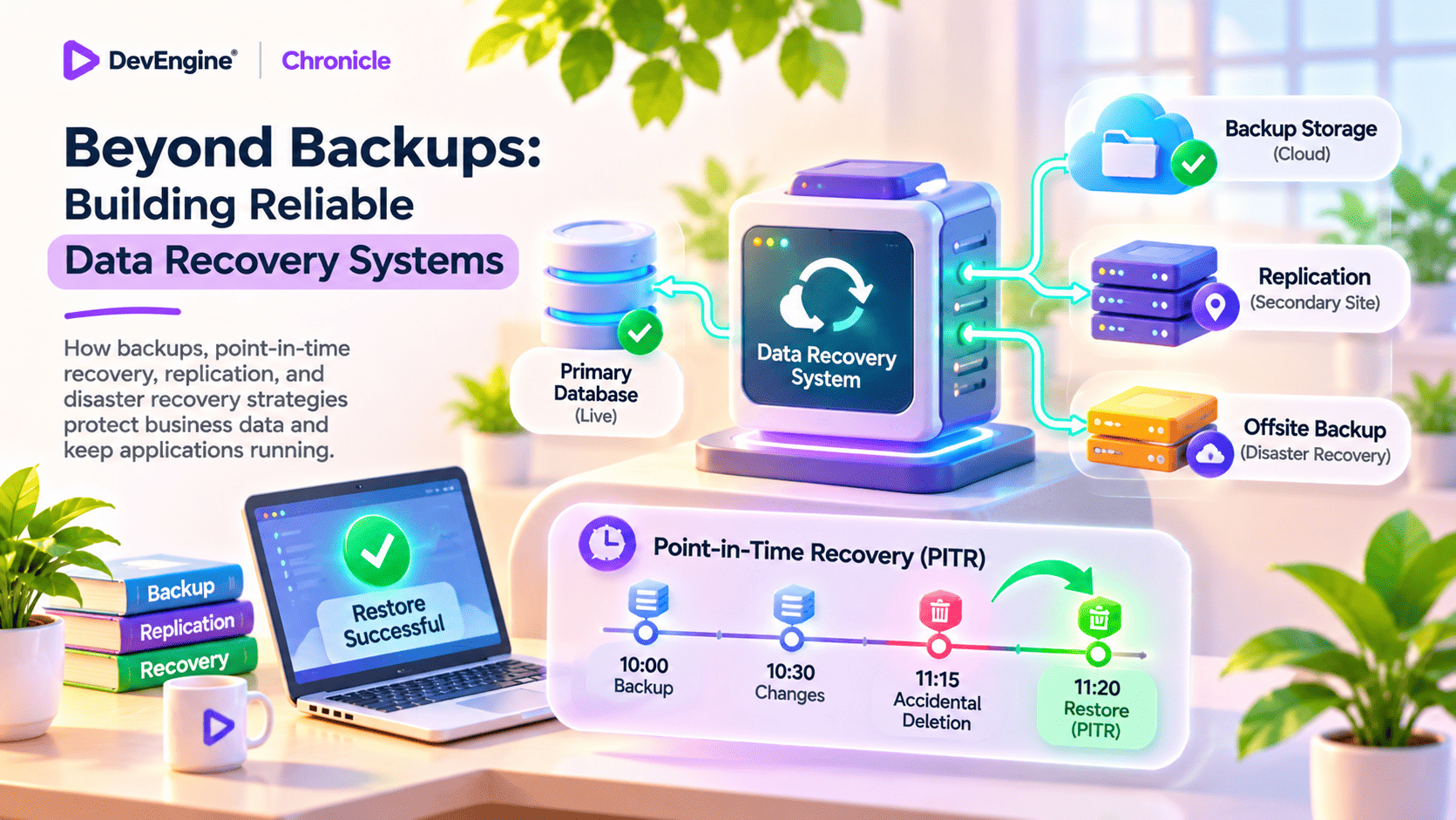
Beyond Backups: Building Reliable Data Recovery Systems
Imagine running a successful digital business where customers create accounts, place orders, make payments, and store important information every day.
Now imagine that your primary database suddenly becomes unavailable.
A hardware failure, accidental deletion, software bug, security incident, or infrastructure outage could make critical information inaccessible.
Having a backup is important, but an even bigger question remains:
How quickly can the system recover, and how much information can the business afford to lose?
Data protection is not simply about creating copies of databases. It is about building a reliable recovery strategy that allows applications and businesses to continue operating when unexpected problems occur.
This is where backup management, point-in-time recovery, replication, disaster recovery planning, and restoration testing become essential.
For modern backend systems, data recovery should be treated as a fundamental part of application architecture.
1. Why Database Backups Alone Are Not Enough
A database backup is a copy of information that can be used to restore data after a failure or unwanted change.
Backups are essential, but simply having backup files does not guarantee that an application can recover successfully.
Consider a financial application that stores thousands of transactions every day.
If its database becomes corrupted, restoring a backup from the previous night might recover most of the information, but all transactions created after that backup could be lost.
Similarly, if an administrator accidentally deletes important records, the latest backup might contain other unwanted changes that occurred after the deletion.
These situations demonstrate why recovery planning needs more than a basic backup schedule.
A reliable strategy should answer several questions:
- How frequently are backups created?
- Where are backup files stored?
- How long are backups retained?
- Can the system restore information to a specific point in time?
- How quickly can the application become operational again?
- Have restoration procedures actually been tested?
- What happens if the primary infrastructure and its backups become unavailable?
The objective is not merely to preserve information. It is to make recovery predictable and achievable.
2. Understanding Different Types of Database Backups
Different backup methods serve different purposes.
The appropriate combination depends on the database technology, application workload, recovery requirements, and available infrastructure.
Full Backups
A full backup captures the complete database or a defined backup scope.
It provides a baseline that can be used during restoration.
Full backups are straightforward to understand, but they can require considerable storage and processing time for large databases.
Incremental Backups
An incremental backup stores changes made since the previous backup in the backup chain.
For example, an initial full backup may be followed by incremental backups containing only subsequent changes.
This can reduce storage requirements and backup duration.
However, restoration may require the original full backup and the relevant sequence of incremental backups.
Differential Backups
A differential backup stores changes made since the most recent full backup.
As time passes, differential backups generally become larger until another full backup is created.
During restoration, the system typically needs the full backup and the latest applicable differential backup.
Logical Backups
Logical backups export database objects and records in a portable representation.
They may be useful for selective restoration, migration, and moving data between compatible environments.
For example, PostgreSQL provides pg_dump for logical database backups.
Physical Backups
Physical backups capture the underlying database storage files or physical database representation.
They are useful for restoring database instances and can support larger-scale recovery strategies.
Database-specific tools and procedures determine how these backups are created and restored safely.
3. The 3-2-1 Backup Strategy
One widely recognized approach to backup management is the 3-2-1 strategy.
It recommends maintaining:
- Three copies of important data.
- Two different types of storage media.
- One copy stored offsite.
For example, a business might maintain:
- The production database.
- A separate backup stored in a different storage system.
- An additional backup stored in a geographically separate location.
The purpose is to reduce the risk of losing every copy through one incident.
For example, if a primary server experiences hardware failure, a separate backup may remain available.
If an entire office or data center becomes inaccessible, an offsite copy can provide another recovery option.
The 3-2-1 approach is a useful starting point, but organizations with critical systems may also adopt stronger variations.
One example is the 3-2-1-1-0 approach, which adds an additional offline or immutable copy and emphasizes verifying backups through restoration testing with zero unresolved verification errors.
The important lesson is that backup copies should not all depend on the same infrastructure, credentials, or failure domain.
4. What Is Point-in-Time Recovery?
Sometimes restoring the latest available backup is not enough.
A database may contain an accidental deletion, an incorrect update, or a software bug that modified records.
In these situations, restoring the database to a specific moment before the problem occurred can be extremely valuable.
This capability is known as Point-in-Time Recovery (PITR).
Instead of restoring only to the moment a backup was created, PITR uses a suitable base backup together with recorded database changes to reconstruct the database at a selected time.
For example:
- 09:00 — A database backup is created.
- 10:15 — A developer accidentally deletes important records.
- 10:30 — The issue is discovered.
- 10:45 — The team identifies the last known safe point before the deletion.
With appropriate recovery logs and backup configuration, the database may be restored to a point before the destructive operation.
PostgreSQL supports point-in-time recovery through its continuous archiving and Write-Ahead Log (WAL) mechanisms.
This allows database administrators to recover to a specified recovery target when the necessary base backup and WAL files are available.
PITR is particularly valuable for systems that process frequent transactions and cannot rely exclusively on daily backups.
5. Understanding Database Replication
Replication is another important technique used to improve database availability and support recovery.
It involves maintaining copies of database information across multiple database instances.
For example, an application might use:
- A primary database that handles writes.
- One or more replicas that receive changes from the primary.
Depending on the replication configuration, replicas may support read operations, availability requirements, or recovery workflows.
Synchronous Replication
With synchronous replication, a primary database waits for confirmation from the configured replica or replicas before acknowledging certain transactions.
This can provide stronger durability guarantees, depending on the configuration.
However, it may introduce additional latency and can affect availability when replicas are unavailable.
Asynchronous Replication
With asynchronous replication, the primary database does not need to wait for the replica to confirm every transaction before acknowledging the write.
This can reduce write latency, but replicas may temporarily lag behind the primary.
If the primary database fails before recent changes reach the replica, some acknowledged transactions may not be available on that replica.
Replication Is Not a Replacement for Backups
This is an important distinction.
Replication copies changes, including unwanted changes.
If an administrator accidentally deletes a large number of records, that deletion may also be replicated.
Similarly, corrupted or maliciously modified data can spread across replicas.
Replication helps with availability and certain recovery scenarios, but independent backups are still necessary for recovering historical data and protecting against destructive changes.
6. Understanding RPO and RTO
A reliable recovery strategy should be designed around two important measurements: Recovery Point Objective and Recovery Time Objective.
Recovery Point Objective (RPO)
RPO describes how much data loss an organization can tolerate, measured in time.
For example, if a business has an RPO of 15 minutes, its recovery strategy should aim to limit data loss to no more than approximately 15 minutes under the defined recovery scenario.
This influences backup frequency, replication configuration, and transaction-log retention.
Recovery Time Objective (RTO)
RTO describes how long a system can remain unavailable before it must be restored.
For example, if an application has an RTO of two hours, the recovery process should aim to restore the required service within that period.
RTO influences infrastructure planning, restoration automation, staffing, and recovery procedures.
Consider two different applications:
A small internal reporting dashboard might tolerate several hours of downtime and a larger recovery window.
A payment processing platform may require much shorter recovery times and stricter data-loss limits.
Different systems require different recovery objectives.
These targets should be established according to business impact rather than selected randomly.
7. Protecting Backups From Security Incidents
Backups are valuable because they preserve information.
However, that also makes them attractive targets during security incidents.
If attackers gain access to production infrastructure and can delete or modify its backups, recovery may become much more difficult.
Organizations should protect backup systems independently.
Important practices include:
Encryption
Encrypt backup data both during transmission and while stored.
This helps protect sensitive information from unauthorized access.
Access Control
Restrict backup permissions to the identities and systems that genuinely require them.
Backup administration should not automatically be available to every application user or developer.
Immutable Storage
Immutable backups are protected against modification or deletion for a defined retention period, depending on the storage platform and configuration.
This can help defend against ransomware and accidental deletion.
Separate Credentials
Avoid using identical administrative credentials for production systems and backup storage.
Compromising one environment should not automatically grant unrestricted access to the other.
Backup Monitoring
Monitor backup jobs, storage capacity, retention policies, and unusual access activity.
A backup system that silently stops working can create serious risks.
8. Disaster Recovery Planning for Modern Applications
Disaster recovery is the broader process of restoring systems and services after a major disruption.
It includes more than database restoration.
A complete recovery plan may need to address:
- Database availability.
- Application deployment.
- Infrastructure provisioning.
- Network configuration.
- DNS and domain settings.
- Authentication services.
- File and object storage.
- External integrations.
- Secrets and configuration.
- Monitoring and operational access.
Imagine that a cloud infrastructure region becomes unavailable.
Restoring a database backup alone will not make the application operational if its backend services, storage, and network configuration remain unavailable.
Disaster recovery planning should identify the dependencies required to bring the complete service back online.
For critical applications, organizations may prepare infrastructure in another region or maintain documented procedures for rebuilding services in an alternate environment.
The appropriate strategy depends on business requirements, infrastructure cost, and acceptable recovery time.
9. Why Backup Restoration Testing Is Essential
A successful backup job does not automatically mean that the backup can be restored.
Files may be incomplete, corrupted, incompatible, or missing required dependencies.
This is why restoration testing is one of the most important parts of a reliable backup strategy.
Teams should periodically perform controlled restoration exercises.
A practical process includes:
- Select an available backup.
- Restore it into an isolated environment.
- Verify database integrity.
- Check important records and relationships.
- Confirm that required indexes and database objects exist.
- Validate application connectivity.
- Measure the restoration time.
- Document any problems discovered.
Testing should also include the complete recovery procedure when appropriate, not just database restoration.
For example, a backend service might depend on environment configuration, storage permissions, authentication providers, and external services.
If those dependencies are missing, a successfully restored database may still not result in a working application.
A tested recovery procedure provides much stronger confidence than a backup file that has never been restored.
10. Common Data Recovery Mistakes
Even organizations with backup infrastructure can make mistakes that reduce their ability to recover.
Some common examples include:
Keeping all backups in one location: A single infrastructure failure can affect every copy.
Ignoring backup verification: A backup that has never been restored may not be reliable.
Using production credentials for everything: Compromised application credentials may also expose backup systems.
Forgetting transaction logs: Point-in-time recovery may become impossible if required database logs are missing.
Choosing unrealistic recovery targets: RPO and RTO objectives must match actual infrastructure capabilities.
Ignoring application dependencies: Database recovery alone may not restore the complete product.
Never practicing disaster recovery: Teams may discover missing permissions, undocumented procedures, or configuration problems during an actual emergency.
Avoiding these mistakes requires ongoing operational discipline.
11. Building a Reliable Data Recovery Strategy
A practical recovery strategy can be developed through a structured process.
Step 1: Identify Critical Data
Determine which databases, files, records, and business systems require protection.
Classify information according to its importance and sensitivity.
Step 2: Define Recovery Objectives
Establish acceptable data-loss and downtime limits through RPO and RTO.
Step 3: Select Backup Methods
Choose suitable full, incremental, differential, logical, or physical backup strategies.
Step 4: Configure Independent Storage
Maintain separate backup copies with appropriate access controls, encryption, and retention policies.
Step 5: Introduce Replication Where Necessary
Use replication when application availability and recovery requirements justify the additional infrastructure.
Step 6: Automate Monitoring
Track backup success, failures, storage capacity, replication lag, and backup integrity.
Step 7: Test Restoration Regularly
Restore backups in controlled environments and verify that recovery procedures work as expected.
Step 8: Document the Recovery Process
Maintain clear instructions covering responsibilities, access requirements, dependencies, and recovery steps.
A good recovery strategy should be understandable and executable by the engineering team, not dependent on one individual's memory.
12. The Future of Data Recovery Engineering
As organizations become more dependent on cloud applications and interconnected software systems, data recovery is becoming an increasingly important part of infrastructure engineering.
Modern cloud platforms provide managed backup services, automated retention policies, replication capabilities, and point-in-time recovery options.
Infrastructure automation also makes it possible to rebuild application environments more consistently.
However, using a managed service does not remove the organization's responsibility to understand its recovery requirements.
Teams still need to evaluate:
- What data is protected.
- How long it is retained.
- Which recovery operations are available.
- Whether backups are isolated from production.
- How quickly services can be restored.
- Whether restoration has been tested successfully.
Automation can make recovery more predictable, but good architecture and operational planning remain essential.
Final Thoughts
Reliable data recovery is about much more than creating database backups.
It requires a combination of backup strategies, independent storage, replication where appropriate, point-in-time recovery, security controls, realistic recovery objectives, and regular restoration testing.
A business should not discover whether its recovery plan works during the same incident that makes recovery necessary.
By preparing for failures in advance, development teams can protect important information and reduce the impact of unexpected disruptions.
At DevEngine, we believe reliable software is measured not only by how well it works under normal conditions but also by how effectively it recovers when things go wrong.
A backup gives you another copy of your data. A reliable recovery strategy gives you a way forward when everything else fails.
DevEngine — Engineering Ideas Into Digital Possibilities.